Setting up: models, modes, the Launcher and the Builder
The four models
Multi-Component Lattice
The most general model in the set. A two-dimensional grid of up to ten site types evolves under the four rule kinds described in Building systems, with per-type fields, pairwise interaction energies, facilitation constraints, masquerading and immobility. Five presets ship with the app, named Ising, Fredrickson–Andersen (FA), Limited Mobility (LM), Esoteric and Exotic.
2D Ising
The spin-½ ferromagnet on a square lattice under Metropolis dynamics. Two states per site, with live Temperature T, Coupling J and Field H controls and a free-energy preview F(m). Below the critical temperature like spins coarsen into domains, and above it thermal noise dominates. The ensemble plots mean site magnetisation against same-type bond excess, bounded by exact theoretical envelopes.
Single Particle in 1D Potential
One particle in a one-dimensional potential, integrated with Langevin dynamics. It is available in ensemble mode only, where thousands of walkers thermalise into a Boltzmann distribution over position and momentum.
Patchy Discs & Polymers
The off-lattice model. Soft discs occupy a periodic box and may carry coloured patches on their rims. Discs move by Langevin molecular dynamics, and patches bind and unbind by Monte-Carlo moves under user-defined rules, which produces chains, rings, networks and micelle-like clusters. Patches are optional, and bare discs interacting through their soft core and disc–disc attractions are equally valid. Discs can also be bonded permanently into bead-spring polymers, built from a palette of bead types and a list of molecules whose architectures range from a free disc to a sequence written bead by bead. Seven presets ship with the app. Self-Assembling Polymers, Honeycomb and Flowers assemble from patch bonds, Binary Mixture demixes two bare disc species, and Bead-Spring Polymers, Diblock Copolymers and ABA Triblock are melts of permanently bonded chains. The full design surface has its own chapter.
Single system and Ensemble
Single system shows one simulation at full resolution. It is the mode for painting, adjusting rules interactively and observing morphology site by site. It is available for every model except the Single Particle in 1D Potential, whose Single system button is disabled.
Ensemble runs a population of independent replicas of one design and draws each as a point in a plane of two measured observables. The lattice models and the single particle take 1,000 to 100,000 replicas, and Patchy Discs 100 to 10,000 boxes, which are considerably heavier per replica. Statistical mechanics becomes directly observable. The cloud drifts, splits and condenses, and traces the model’s phase behaviour in real time. Ensembles run on the compiled C core across several CPU cores.
Both axes are selectable for the Multi-Component Lattice and Patchy Discs, using the class and variant pickers in View Settings. 2D Ising and the Single Particle plot fixed axes, magnetisation against same-type bond excess and position against momentum respectively. For Patchy Discs each ensemble member is an independent box of the designed molecules, and small boxes of a few dozen discs are the practical choice.
The Launcher
Stochasm runs in three stages. The Launcher selects what to simulate, the Builder specifies it, and Initialize hands over to the running Simulation, whose tabbed control panel is covered in Simulating systems and Watching systems. This chapter covers the first two stages.
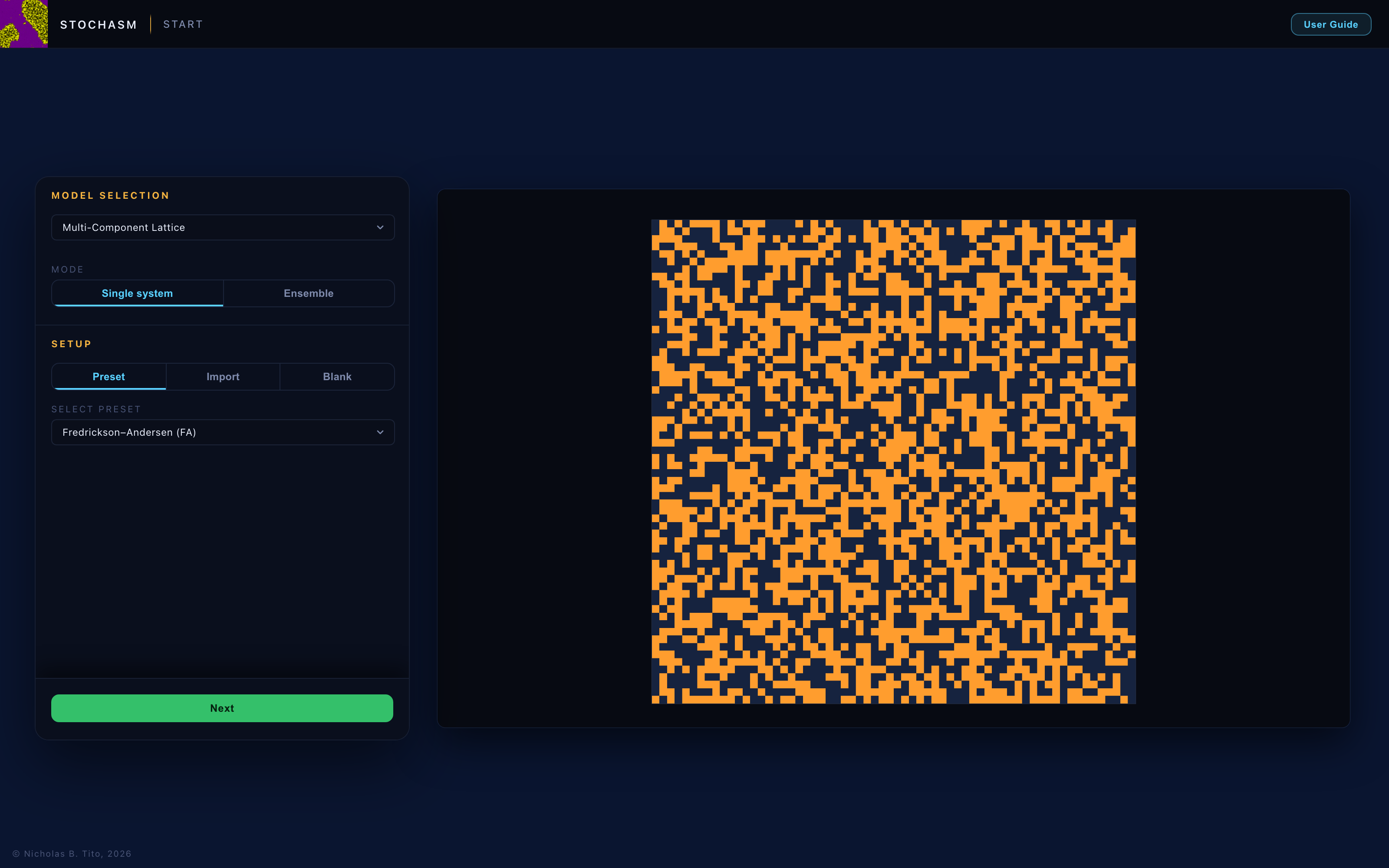
The Launcher is the card shown at start and after Start Fresh. Its Next bar stays below the card until a system has been defined, by a preset selection, a valid pasted configuration, or a Blank design, and then rises into view.
Model and mode
The model dropdown and the Single system / Ensemble toggle. Everything below adapts to this choice.
Setup
For 2D Ising and the Single Particle, Setup is a single Initial Distribution choice. Ising offers Hot (random), Cold ↑ and Cold ↓, and the Single Particle offers Thermal and Coherent. For the Multi-Component Lattice and Patchy Discs, Setup selects where the design comes from.
- Preset (the default). A ready-made design from the shipped library, previewed on the stage immediately. Presets seed randomly at the lattice size chosen in the Builder. Builder edits to types and rules carry into the run, and returning to the Launcher re-derives the original preset at the next Next. For the Ising, Fredrickson–Andersen and Limited Mobility presets the defining literature reference appears beneath the picker, with a DOI link.
- Import. A Stochasm JSON configuration, pasted in. See Saving & sharing. The design launches exactly as specified. If the JSON carries a stored lattice snapshot, a checkbox in the Builder’s System section pins that exact initial state, and Reset Simulation mirrors the choice.
- Blank. A minimal starting design, built up by hand. For the lattice model this is a chosen number of generic site types and no rules. For Patchy Discs it is a stock design of two bead types, one patch type and one rule.
Next refuses to advance while the system is undefined. A Preset with no selection reports Must choose a preset., and an empty or invalid Import reports the parse error in red beneath the text area. When the design is valid, the launcher card slides away, the preview moves to the left, and the Builder card arrives from the right.
The Builder
The Builder holds every structural decision, whatever the source. An imported design is as editable as a blank one. For the Multi-Component Lattice and Patchy Discs it has two steps. Step 1 holds the system and its constituents, and Step 2 holds the rules and the compute settings. The stage label reads BUILDER · STEP 1 OF 2 or STEP 2 OF 2 accordingly, and BUILDER alone for 2D Ising and the Single Particle, which fit on one card. The green button reads Next on Step 1 and Initialize on the final step, and Step 2 carries a Back button that returns to Step 1.
System (Step 1)
The seed settings. For the lattice models these are the square Lattice size L×L slider (16 to 256 per side, with snap points at the powers of two) and, in ensemble mode, the # of Systems slider (1,000 to 100,000, with snap points at 1k, 5k, 10k, 50k and 100k). For Patchy Discs they are # of discs (20 to 5,000, logarithmic, with snap points at 100, 500, 1,000 and 2,500), Packing fraction φ (0.05 to 0.70), and in ensemble mode its own # of Systems slider (100 to 10,000 boxes, default 1,000). A Regenerate initial configuration button draws a fresh starting arrangement of the same design, re-seeding the single box or every system in an ensemble. The readout directly beneath it reports what the current draw produced, in chains and in discs placed against the disc budget.
A Blank lattice adds the Site types slider (2 to 10, the compiled core’s limit). An import whose JSON stores an initial lattice adds the checkbox Set lattice to initial state stored in JSON config. directly below the size slider. It is selected by default, fixes the lattice size to the snapshot’s own dimensions, and makes Reset Simulation return to the stored state. Clearing it seeds randomly at any size, and Reset Simulation then re-seeds randomly as well. The snapshot is retained either way and can be re-selected.
Constituents (Step 1)
The structure editors, below the System settings. For the lattice model, each site type’s name, colour, default initial occupancy, Immobile flag and masquerade target. For Patchy Discs, the Particle design editor, which stacks three cards. Patch types are the bonding species, Bead types are the palette describing what a bead is, in size, shape and patches, and Molecules are the population standing in the box, each an architecture over the palette with an abundance. Every edit re-seeds the stage preview, so the preview always shows what will launch. One exception applies. While an imported snapshot is pinned, occupancy edits do not regenerate the preview, and a green note at the top of the Site types list states that the new values take effect whenever the lattice is next seeded randomly.
Rules (Step 2)
Pressing Next replaces the constituents card with the rules card. For the lattice model this is the complete Rules editor and its interaction matrix. Rule structure is set here, and each rule’s parameter is tuned under Simulation once the system runs. For Patchy Discs it is one rule editor covering both rule kinds, with the patch-bond matrix and the disc–disc matrix beside it. Each matrix appears only when it applies.
Compute (Step 2)
The final Builder section. The Compiled C Core switch is on by default and disables itself with an amber warning on a browser that cannot run it. In ensemble mode the # of CPU Workers slider sets how many cores the replicas are split across, defaulting to half of what the browser reports and capped at 16. It is dimmed and inactive while the compiled core is switched off. While a run is held (see below), the switch and the slider keep the values that run was launched with. Both are dimmed, and a note beneath them states that going back to Step 1 or to Setup discards the run and makes them editable again. For Patchy Discs a Cell Lists switch selects an O(N) neighbour search that is bit-identical to the brute-force pair loop, and should be left on except for comparison. Since it changes no result, it stays editable while a run is held and takes effect on Resume.
Initialize turns the previewed system into the running one. Structure is then fixed, and the Simulation stage shows the design read-only. The header’s Back to Builder returns here at any time, landing on Step 2 with the run held. Resume Simulation returns to it untouched, and Re-Initialize re-seeds every system from the current design while controls and views stay in place. An edit that would change the seed marks the held run stale, which disables Resume Simulation and changes the amber note to say that Re-Initialize is required. Returning Back to Step 1 discards the held run, and an amber note directly beneath that button states this first. The round Setup button at the top left of the stage returns to the Launcher with its source, pasted JSON and preset selection intact, and also discards any held run. Pressing Next then re-derives the design from that source, so edits from an earlier cycle do not carry into a fresh setup.